INX translator

This script generates a PO file from a INX file. It also allows you to modify the file structure visually to mark new translatable elements.

How it works

Drag your INX file to the marked field in the original INX tab and the PO file is automatically generated ready for download.

Edit the INX

When loading the INX we can add translatable parts from the Scheme tab, the parts marked for translation are highlighted in green and the translatable parts that have not been marked in red, just click on them to make them translatable. If any of them are checked, it is advisable to download the modified INX file.

INX file updates

If the inx file has been previously translated and we have a PO file, we can drag it to the optional PO tab to assign them directly to the generated PO file.
If this is a new version of INX and you have a PO file with previously translated values, copy and paste the content of the PO in the following text field to be automatically assigned to the generated PO

Path Shape creator: Updated for use with Gimp 2.10

This new version of the plugin to create routes with gimp works with version 2.10 and  higher, the resulting forms can be used with the Follow path extension.

Installation

Download the zip and unzip it into the plugins folder of your Gimp installation. In this article you can see more information about it: https://www.arakne.es/en/gimp-scripts-python-where-to-install/

Download

arakne-path-shape-creator8-2022

FreeCad macro: Connect spheres

With this macro you can create cylinders or cones that connect spheres just by selecting them in the order you want.

Installation

Download and unzip the zip file and copy the content to the folder of your choice, you can check the path where FreeCad saves the macros by default from the top menu Macros> Macros…, in the dialog box that shows us we can see the path or change it to the folder where we save the file.

Download

connectSpheres

Inkscape Shapes: new version compatible with inkscape 1.2

New in this version

This new version adds some improvements:
  • Fixes a bug that made selected objects that are not paths not return the exact measurements. At the moment the bounding boxes of text objects still cannot be calculated.
  • Adds the Arch object in a new tab that includes 11 types of arch:
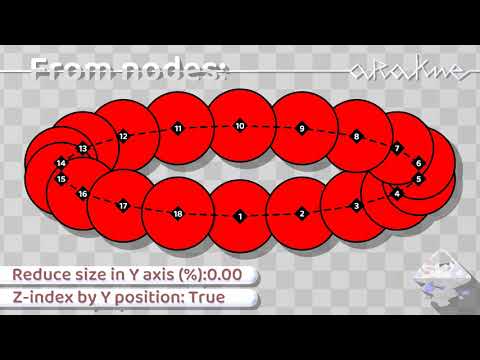
  • Adds a new option to From nodes: Tabs that allows you to easily create tabs for cutouts and the Reverse path option, which reverses the direction in which the nodes are created, useful for this new form and for Number nodes
  • New option in Join circles: Tangent inside
  • New option in Join circles: Only join shapes, With this option activated, the initial circles are not generated in the resulting shape, which allows optimizing the number of nodes if it is used in booleans.

Download

arakne_shapes_1b

Gimp python plugin:Rotate image using Paths

rot2.py is a plugin for rotating the image using two reference points, it is only necessary to create a path with two points and call the plugin from the window of Paths with the right mouse button on a selected path and click “Tools> Rotate by path…”. In the window we just have to select the type of interpolation to be applied to the rotated image and if we want the plugin resize the image to fit all layers

Download

rot2

MySQL: replace strings generator

Fill in the text fields with the query data to generate the mysql code

Gimp Python plugin GuidesLab: updated and solved bug in windows version

New in this version

This new version adds new measure units for the guides, to the previous pixels and percent, cm, mm and inches are added.

Bug corrections

The new code avoid the bug in the Gimp 2.10.2 Windows version that do not import external files.

Changes in the E2 version

This revision fixes a fail in the interface and adds the option to use negative values. The negative values add the guide in the oposite side (width or height – the selected value), for example for a image with 200px width, -20 adds the guide 180px from the beginin.

Download

arakne-guide-labE arakne-guide-labE2